Buy anything from 5,000+ international stores. One checkout price. No surprise fees. Join 2M+ shoppers on Desertcart.
Desertcart purchases this item on your behalf and handles shipping, customs, and support to Gibraltar.
🚀 Power up your home network with lightning-fast, seamless WiFi everywhere!
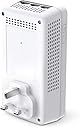
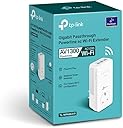
The TP-Link TL-WPA8631P is a high-performance AV1300 powerline WiFi extender featuring dual-band speeds up to 867 Mbps on 5 GHz and 300 Mbps on 2.4 GHz. It includes 3 gigabit Ethernet ports for reliable wired connections and supports OneMesh for a unified, seamless network experience. With plug & play setup, integrated power socket, and 2x2 MIMO beamforming, it ensures stable, wide-range coverage ideal for streaming, gaming, and smart home devices.


| ASIN | B08LX61KDL |
| Best Sellers Rank | 912 in Computers & Accessories ( See Top 100 in Computers & Accessories ) 5 in Powerline Network Adapters |
| Box Contents | TL-WPA8631P |
| Brand | TP-Link |
| Brand Name | TP-Link |
| Color | White |
| Colour | White |
| Compatible Devices | Desktop, Desktop Computer, Game Consoles, Laptop, NAS, Printer, Smart TVs, Smartphone, Tablet |
| Compatible devices | Desktop, Desktop Computer, Game Consoles, Laptop, NAS, Printer, Smart TVs, Smartphone, Tablet |
| Country of Origin | China |
| Customer Reviews | 4.2 out of 5 stars 348 Reviews |
| Data Link Protocol | Gigabit Ethernet |
| Data Transfer Rate | 1300 Megabits Per Second |
| Data link protocol | Gigabit Ethernet |
| Hardware Interface | Ethernet |
| Hardware interface | Ethernet |
| Item Dimensions L x W x H | 15.2L x 7.7W x 7.5H centimetres |
| Item Weight | 0.54 Kilograms |
| Manufacturer | TP-Link |
| Manufacturer Part Number | TL-WPA8631P |
| Model Number | TL-WPA8631P |
| Product Warranty | 3 year manufacture |
| Product dimensions | 15.2L x 7.7W x 7.5H centimetres |
S**T
Brilliant devices
We stream TV, game and video conference using these. Very easy to configure, just press the pair buttons; more detailed configuration (which many might not need and there is a detailed user manual you can download from tp-link) using the web interface is self explanatory but I have more IT experience than is typical; you should bear this in mind if you are less experienced. The web interface offers great flexibility, crucially it offers the all important MAC address white listing (I won't entertain any WiFi without this capability), for fun you can even schedule when the LEDs turn off at night which is actually useful in a bedroom. Find the web interface at the private IP address your broadband router assigns it, most likely starting '192.168', or download the tpPLC utility from tp-link and access your device's web interface via tpPLC by clicking on the little globe which pops out to the right of your device (give tpPLC a few minutes to sort itself out, then hover over your device and watch the globe pop out). Clicking the globe will open a browser at the appropriate IP address, the first time in you'll need to set a device access password (this isn't the SSID WiFi password). Each WiFi capable tp-link device will have a different IP address. The default device IP is provided by your router's DHCP server but you can statically configure. The TL-WPA8631P also provides a DHCP server with configurable address range (you can disable it). The WiFi has WPA/WPA2/WPA3 security, 3 power levels, a guest network off by default, parental controls for specified MACs, 2.4GHz and/or 5GHz can be switched off. There's facility to backup/restore settings, some settings can be synchronized (or not) across devices, you can list connected clients. I downloaded the user manual from tp-link to check it had the features I needed, it's comprehensive and runs to about 45 pages. My house has brick internal walls dating from mid 20th century and covers an area large enough to make WiFi difficult. The house wiring is approximately 15 years old, I have no ethernet cables between rooms, I rely on powerline data transmission using the house ring circuits. I find no problem running powerline devices on simple inexpensive extension leads (without power filtering) and somewhat surprisingly find these devices work between ring circuits; I don't understand why this is but it's likely because I don't understand my house wiring well enough (it was rewired before I moved in). The takeaway is that in my house the powerline works very well everywhere, even in the 'garden office' which has its own ring circuit and is 60ft from the house, but it might not follow you will get the same performance; from what I read your house electrical wiring is critical to your experience. I currently have four AV1000 (max 1000Mbps over powerline and with 1Gbps wired ethernet) and two AV1300 (max 1300Mbps over powerline with dual band wifi and 1Gbps wired ethernet). I downloaded the tpPLC utility from tp-link and run it on Windows 11; it shows the powerline speed being achieved between the various devices in my house is more or less half the max theoretical speed of the slowest device. Thus AV1300 to AV1300 is typically ~700Mbps, AV1300 to AV1000 is typically 400/500Mbps and AV1000 to AV1000 is also 400/500Mbps. The tpPLC utility shows these numbers vary over time over a small range. Whether these speeds are a realisable data rate for connected devices I don't know, I assume there are loses and actual connection speeds for equipment will be slower. The broadband speed to my house over fibre is 130Mbps. Speed tests from computers to the internet using ethernet cable connected to the 1Gbps ports show me achieving 120/134Mbps so powerline isn't causing a bottleneck and I'm seeing my full broadband speed. When I increase my broadband speed to 264Mbps it will be interesting to see if I see this greater speed over powerline. The AV1300 TL-WPA8631P offer 2.4GHz & 5GHz wifi. At 5Ghz I also achieve 120/134Mbps, at 2.4GHz this speed seems to drop sometimes to 100+Mbps; I was surprised by this because the TL-WPA8631P is rated at 300Mbps for the 2.4Ghz wifi. Otherwise horses for courses, 2.4GHz penetrates brick walls much better than the 5GHz and I switch off whichever wifi frequency works less well in the environment it is being used, typically using 5GHz only within a room and 2.4GHz between rooms through brick walls; it stops connected wireless devices sometimes choosing the less strong/fast signal; that's a typical wifi issue not limited to these devices. The wifi TL-WPA8631P have excellent configuration options when using their web interfaces, including MAC white listing which I use extensively, and one can restrict a MAC (eg a child's smartphone) so it can't access WiFi at night. Being able to restrict MACs on a school night is essential, they learn soon enough not to use up their 4G phone data. I have not tried using OneMesh, my broadband router doesn't support it and I don't find the need for Mesh WiFi. Rather than have all network names (SSID) the same and experience the commonplace wifi issue of a computer hanging on too long to a weak signal from a distant access point and not knowing which access point you are connected to, all SSID names are different and we know where we are connected; that is fine for us. If you walk around your house while in a video conference your mileage might be different and need Mesh wifi. Overall I have found these powerline devices amazing; for my purposes these devices beat dragging ethernet cables around the house. If you have Gigabit broadband and want to see it in distant parts of your property then wired ethernet might be the way to go (though I note powerline equipment with speeds faster than AV1300 are available which I have not tested) but for more modest speeds, like my 130Mbps broadband, and good house wiring, this might be all you need. I have not tried mixing different vendors, all our devices are tp-link. I've updated the firmware on both of the TL-WPA8631P, because it was there not because I needed to, I used the web interface but the downloaded tpPLC utility also has the facility to do this.
K**N
Well known brand, good support, solid products
Just had the broadband upgraded to FTTP by BT, so wanted to take advantage of higher speeds in my study, which is on a different floor of the house. Previously used a pair of rather ancient powerline adapters, also TP-link products and was interested in this item because I thought it would be faster for large bandwidth transfers, which I do regularly and also incorporates a WiFi repeater. As we have masonry walls in the house, the WiFi from downstairs is badly attenuated. First thing to note: the box contains just 1 PLA, so either order 2, or another that is compatible, probably without the WiFi function. Installation is as simple as plugging in, hitting first the pair button on both ends and then the WPS function to synch the WiFi. 5 minute job. Unfortunately in my case, the wiring in my house has meant that I couldn't get any faster bandwidth (achieves approx 85 Mbps transfer on Speedtest on a 1Gb optical fibre throttled to 150Mbs)> I also found that the WiFi speed is also attenuated. It's worth downloading the app as well as it provides many extra security and usage functions - like turning off certain devices when it's time for the kids to go to bed. UPSHOT: So, although the product is no good for me and has been returned to amazon for credit, it is a brilliant bit of kit an no doubt it will work fine in a house with solid walls, especially if you can located the 2 PLAs on the same ring main.
T**Y
Solved remote access
Needed a wifi connection in my workshop set at the end of the garden. Luckily I had a hard wired gigabit connection near the same house electric circuit to the workshop so the base unit could be plugged in and onto the main network relatively simply. (An absolute requirement for the system- it won't work off two different electrical circuits). Signals now run up the armoured cable out to the shed and to the wifi unit. It's not the fastest of connections giving me adequate performance that end, but allows a wifi cctv camera to work well enough and serve the equipment in the workshop.
R**S
Fast, effective, secure, and simple to install
The TP-Link TL-WPA8631P(UK) AC1200 AV1300 power-line extender for Ethernet and wi-fi works a treat, exactly how we need it. I paired it in just a few seconds with an existing TP-Link TL-PA4010 AC600 sender, and almost immediately the tlPLC Utility reported a stable link speed of 320Mb/s across 35 and 45 metres of ring main from the sender. Security options are available for its wifi hub, via its wifi or wire linked from PC, when using a relevant Utility. They allow one to set robust admin name and password, as well as a strong wifi password. There are also options for timed access, parental controls, guest access, optimum mode of operation, wifi power level, everything one might need. I did not bother with OneMesh etc. After reading the somewhat sketchy instructions with a generic EU picture for the different shape and inverted (but more ergonomic) UK device, initial setup and function test only took a couple of minutes. To do this I secured the admin name and password using the tlPLC Utility on the PC. Download of the latest version of the Utility from the manufacturer was quick, and detailed configuration for better security and usability took about ten minutes working through all the options. One useful option for intensive use is the ‘preferred usage mode’, but I’ve set it for internet as a TV only takes about 8Mb/s even on HD and our broadband is only 50Mb/s. Wifi access to a crucial aspect of network security could be a bad thing or a good thing, so I’ve set a very strong admin password, just as I’ve done with the router. It may be more fiddly with a phone, but typing is easy on a PC, so no big deal. One of my rooms is blocked from the wifi in the rest of the house by too much steel and masonry, but fortunately it is on the same ring main as my internet hub. This extender with the three ports and the remote wifi hub was ideal, and the TV and DVR are plugged into two of the ports while the wifi allows use of tablet, phone and laptop, all simultaneously while remote from the main hub. I set a different wifi password and hub name from the main hub simply for convenience of setup and better security although they could have shared them, and because previously one phone had difficulty in deciding which hub to use when the password was the same. Two different passwords and the phones, tablets and laptops change hub seamlessly as we walk around the house. It replaced an increasingly unreliable old TL-WPA4220 AV600 . The louder the whistle from its power supply, the less effective that old one became. It died just a month out of warranty, but I could not be bothered with the hassle of arguing about something so cheap.
N**E
Great product!
This is my fourth. Great product. Easy to set up. Works well. I wish I could say the same for Amazon's delivery. This item was not packaged - the address label was just stuck onto the box, so it was obvious what it was, and it was left near to my gate, next to a main road, 60 feet away from my house. My order shows that it was "Handed to resident". This is a lie - I was 20 miles away when delivery took place. This poor customer service seems to be the norm now, which is very disappointing. Amazon no longer have an email address to raise this type of issue, and the only options under Customer Service are undelivered or damaged. Maybe they no longer care……. I don't expect the above paragraph to feature in my review, but if customer service IS important then perhaps Amazon could contact me quoting the order number. I have photos …….
N**N
Lasts a year max. TP and Amazon won't help. Spend will goes to 'money heaven'. Caveat emptor
Purchased as an extender with the main kit - AV1300 - TP-WPA8631P. Amazon claim that my review for that is already published (really?). But back to this and the kit - AV1300 - TP-WPA8631P. It worked for a while (purchased April 1 '25, now 30 July) but then stopped. Used it as an Ethernet extender (over power circuitry). Been through wih the manufacturer's support team, they can't give any explanation other than going through all the processes I have already, but it has stopped working. I purchased an identical kit in December 2023. The same happened, although the 'system' worked for just over a year. Built in obsolescence? TP told me to get a refund from Amazon, but I can't as it's now over 30 days. They don't want to help anymore. So if you do purchase this, don't expect it to work for very long. A year - you're doing well. Oh, the instructions are useless, they dscibe a different range of units, all for Euro connectors and all with different layout. Not very helpful. One star is being very generous. This - and I made the mistake of buying the same again - has cost me nearly £400 in eighteen months. A bunch of cowboys. Poor product, built-in obsolescence (won't last) and customer care to match................ Caveat emptor
S**D
Good WiFi with 3x AC1200’s
We live in a 1950’s house with brick internal walls. A WiFi router is just enough to cover 2 rooms and a WiFi mesh system would not penetrate the walls. . With the AV1300 Powerline adapter connected to a Fritz!box router and 3x AC1200 WiFi extenders (1 in the middle and one at each end of the house), the whole house has a good signal and there are no dropouts. I’ve shared the Fritz!box WiFi log in details across all 3 extenders so now there is only 1 password for the whole system. This was achieved by pressing the WPS button the router and then the WiFi buttons on the extenders. The router is set as a mesh master and you can move around the whole house with your device and not notice any WiFi changeover or drop-outs. I’m also using the ports to connect to a smart tv, Apple TV and hue bridge. Very pleased with the whole set up. Would have preferred the ports on the extenders pointing towards the floor for neatness and to not obscure the on/off switch on the wall-socket, but the switch is rarely used. Also like the fact that there is still a socket available (pass through) on the front of the adapter and extenders. Highly recommended for older houses.
P**.
"Cloning" your network doesn't mean a single network
I had an existing Powerline set up to a wired connection from my router to my PC, but bought this to improve wireless speeds to upstairs bedrooms. Set up was easy, plug the new adapter into a socket neat an adapter already in the network, press pair on the connected adapter, the power light flashes, then press the pair button on the adapter you want to pair. Once paired, place the adapter where it is needed, then press the WPS button on your router, then press the wifi button on the side of the adapter & if successful the 2 wireless lights will go from flashing to steady on. Wireless speeds to both bedrooms were markedly better, but, hence only 4 stars, even though the TP-Link app said the extender was broadcasting on my original network & even showed the password as the same, my router still detected it as a second network & seemed to split the bandwidth between them, so instead of a wifi 6 network with speeds of 350Mb/s, I had a wifi 5 network with speeds of 175Mb/s, even in the same room as my router. Eventually removed this & installed a mesh network which is giving wifi 6 & full speeds throughout the house.
Trustpilot
2 weeks ago
4 days ago