We remain fully operational. Our teams are working around the clock to ensure your deliveries continue safely.

DOWNLOAD THE APP


Copyright © 2025 Desertcart Holdings Limited
DOWNLOAD THE APP


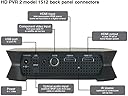
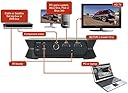


🎥 Capture Every Epic Moment in HD — Don’t Just Play, Immortalize!
The Hauppauge 1512 HD-PVR 2 is a professional-grade HD video recorder designed for gamers and TV enthusiasts alike. It records 1080i HD video in real-time using a hardware H.264 encoder, supports HDMI and Component inputs for versatile device compatibility, and includes digital audio (SPDIF) plus IR Blaster technology for seamless set-top box control. Compatible with Windows PCs, it comes with all necessary cables for quick setup, making it the ultimate tool to capture and share your best content with crystal-clear quality.


| ASIN | B00BA4ILX8 |
| AV Output | HDMI |
| Antenna Location | Video Recording |
| Best Sellers Rank | #344 in Internal TV Tuner & Video Capture Cards |
| Brand | Hauppauge |
| Built-In Media | 6v 1.6a power supply, HD PVR 2 high definition H.264 personal video recorder, USB 2.0, HDMI cable to connect to your TV monitor, Hauppauge A/V adapter cable with Component video connectors, to connect to your cable or satellite box, Hauppauge Capture (download), IR blaster cable, Quick installation guide, USB cable, WinTV v8 (download) |
| Compatible Devices | Laptop, Personal Computer |
| Customer Reviews | 4.3 4.3 out of 5 stars (421) |
| Global Trade Identification Number | 00785428015125 |
| Hardware Interface | USB 2.0 |
| Item Dimensions | 6 x 6 x 1.5 inches |
| Item Type Name | Hauppauge 1512 High Definition Video Recorder - Records Video from Cable, DVR or Satellite Boxes |
| Item Weight | 2 Pounds |
| Manufacturer | HAUPPAUGE |
| Mfr Part Number | 1512 |
| Minimum System Requirements | Minimum system requirements: A PC with a 3.0 GHz single core or 2.0 GHz multi-core processor and compatibility with Microsoft Windows 10, 8, 7, or Vista (32 or 64-bit). |
| Model Name | 1512 |
| Model Number | 1512 |
| Operating System | Windows |
| Other Special Features of the Product | High Definition Video Recording, Hardware Encoder, AC-3 Audio Recording, IR Blaster Technology, Live Streaming |
| Platform | Windows |
| Tuner Type | digital |
| UPC | 387298275854 809394262977 846764229123 311749849837 012300519342 645913680750 780746930242 031112406633 163120663224 803982763822 863121577116 785428015125 012951597577 |
| Unit Count | 1.00 Count |
| Video Capture Resolution | 1080p |
| Warranty Description | 2 years |
G**G
Great Video Capture Device
My old AverMedia system quit working so I decided to try this Hauppauge DH-DVR System. I used this system to capture video from my DirecTV Receiver and, using an HDMI Splitter, I was even able to connect my Roku 3 Player to bypass HDCP protection. I thought about giving the Hauppauge 4 stars because it isn't the easiest system to set up, but the performance is so good it really does rate 5 stars. I had to read the instructions several times before I clearly understood the setup procedures. Overall it also took me about an hour to set up. Once you know how to do it, however, you should be able to set up, install the software and connect the system in under a half-hour. The system doesn't come with an installed CD, you must download the software from the Hauppauge web site. It was also a little disconcerting to hook the Hauppauge hardware up but not see any video. You must complete the software installation on your PC before the video is connected. However, once I finished this set, the video popped right in. As for performance, the Hauppauge PVR is all that is advertised. I can now view and capture video from either my DirecTV receiver or from my Roku. The Hauppauge isn't error-free however; I do find that when changing channels on my DirecTV receiver, I see a brief flash of color bars on my screen before the receiver connects to the new channel. This will happen on the Hauppauge since it is connected to the PC. Not a big issue, just something I have to get used to living with. This system comes with several software tools to view input on your PC, plus a special Hauppauge capture app which works superbly (manual and timed record, stream video and a YouTube Link to upload videos). Overall, the Hauppauge HD-PVR does everything I hoped it would and does it well. I don't miss my old system one bit.
P**.
Gets my jobs done!
I bought this because there are short clips I like to save from my DVR, like when I was on the evening news being interview. Just like to save those clips and place them onto YouTube for posterity. I also had a few 8mm tapes and dozens of VHS tapes that I wanted to convert to digital and save in the cloud/YouTube. I was hoping I could use the component adaptor with a composite cable to get the job done. After I purchased it and installed the software, I just able to hear to audio but could not see the video with that setup. I decide to buy the composite adaptor from the Hauppauge website, since no one else carries it. With tax and shipping, it came out to just under $20 and took about a week to get from NY to CA. The cable adaptor did the trick. With my slower Windows 8 ASUS laptop, I had to make setting modifications to get the video to show up correctly. However with my ROG ASUS Window 10 laptop, no setting adjustments were needed. Might be because that has a better video card. With HD videos, it is flawless and pretty much plug and play. I just watch TV with my HD DVR. If I like something I see, I record it to my DVR, then I replay and capture it with my Hauppauge PVR later. The software for editing the video is not the greatest. It records in .TS but can be exported to.MP4. I started using Windows Movie Maker to edit the videos and HandBrake to crop and compress them. My work can be seen at youtube.com/nitebone as I have already uploaded over half a dozen videos. One last thing I noticed, many of the reviews have an older version of the device which looked different than the new one I got. I took a picture of the back of the new one to show how the inputs are different on the newer devices. The cable looks like an S-video connector but it is not. It is a unique connector from Hauppauge and one looks like S-Video while the older ones had a flat shaped connector that plugged into the device.
D**R
The best capture box you can get for under $500
This makes excellent recordings from the component inputs and drives my HD tv. It goes between the cable box and TV so it can record from the cable box and play videos off your pc. I am running win10 x64. Use high quality USB cables and keep them to no more than about 12-15 feet. If it is too long the capture utility will not see the PVR. The software is a bit persnickity, but works far better than any other capture software I have ever used. I gave it a 4 on "easy to use" because there is no such thing as video software that is easy to use (hee hee). It works best if I power cycle the PVR before I record. Otherwise the Capture utility sometimes drops out entirely or fails to write a complete file. I have the PVR wall wart plugged into the back of my stereo so I can restart it via the remote. Otherwise you have to reach in back and unplug the power cable, which often unplugs video cables too. Be sure you have plenty of CPU and RAM. I keep task manager running to kill firefox if necessary so the pc does not run out of memory. Do not run any cpu hogs while recording. If the PC runs out of memory and goes into drive swapping, the PVR cant write to disk. When you stop recording, give it about 15 seconds to write the MP4 file and delete the temp files before exiting the capture utility. Picture quality is quite good writing at 11mbs with VBR. You can select the speed up to 14mbs via a slider. File size is about 5gb/hour. It is noticeably better than DVD quality. Be sure to enable hardware encoding in the Capture software settings. In that section of settings, I use the full video decoder and EVR renderer. That works fine for me. If things are working right it will show a 1920x1080 60fps input below the capture screen. You can also plug in a VCR and record old tapes via the input cable and select what you want to use. You need a video card that supports hardware encoding or you wont be happy with CPU utilization. My Intel I5 does not support hardware encoding. I don't know about other newer CPUs. After a lot of looking around I settled on a Geoforce GTX 1660 with multiple outputs. It works fine with the Capture software. It takes a bit of monkeying around to get the color/contrast/brightness settings right. You can change things while monitoring the TV picture in the Capture software. But, if you make a change you have to restart the capture software to realize the change in a recording. I also find that I have to start the capture software twice. The first time, it takes a long time to load and capture latency is really high. I exit it. The second time I start the Capture utility it loads quickly. If the PVR is working efficiently there is a 2-5 second delay between the source video and what you see on the screen. There is usually a 2-second delay when I begin recording. It often is about 4-5 seconds at the end of the recording. I have seen it as much as 10 seconds by the end of the recording (dont stop recording until you see the end of the video in the capture window!) If you are recording MP4 and the file does not get written, the temp TS file is usually good. Use the edit function of the capture software to create the MP4. It does the conversion but is very slow. Also, the PVR forgets its configuration (that is set in the Capture program) and reverts to HDMI (default) input. It also magically decided to use the vga inputs once or twice. If that happens, you won't see anything on the component video outputs. Just fire up the capture utility and reset the input to component and it works again. It is best to create a recording directory easily accessible in Program Manager. The default directories the Capture utility uses are buried in the Windows/Users directory and difficult to access. I save both videos and screencaps to the same dir. Hauppage has a tech support website which works via email, but they are slow to respond and not particularly savvy. They are only good for granny answers. They don't know most of what I put in this review.
C**N
Ce cadeau a comblé mon fils qui l'utilise régulièrement pour enregistrer ses parties avec ses potes et poster le tout
S**N
I purchased this unit to replace an earlier version and it performs exactly as required, with the useful addition of optical audio input
M**E
Due to mix up with their model numbers - the gaming edition was sent in error. It was returned. Hauppauge needs to clarify it's models so the correct one can be selected
D**O
Prodotto come da descrizione, fà quello che promette. PRO |> Registra formato video 1080 sino a 30 fps, cattura audio 5.1. CONTRO |< Software scarno, bisogna che sia collegato al pc per funzionare. | Tutto sommato sono soddisfatto dell'acquisto, se fosse costato meno sarei stato piu' contento.
C**N
Non adatto per ps4... Non riesce a sopportare i 60 fps ho comprato poi quello da 60 e va una bomba!!! Credo che per la hold generation vada bene....
Trustpilot
2 weeks ago
1 week ago